

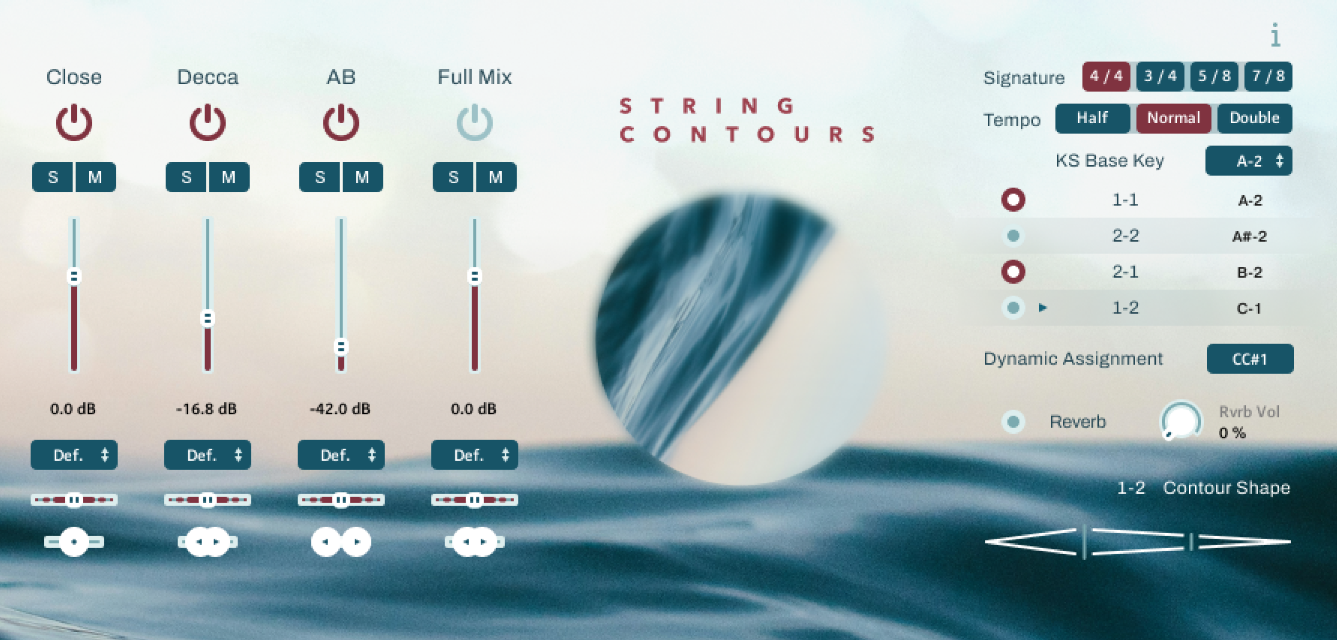
Strezov Sampling has released String Contours: Solo Cello Sul Tasto, a free Kontakt Player instrument derived from the company’s commercial String Contours series. Rather than offering a traditional solo cello patch focused on individual articulations, this free release takes a more specialized approach centered around evolving dynamic contours and expressive swells.
The library is built around a single Sul Tasto articulation. For those unfamiliar with the term, Sul Tasto refers to bowing the strings closer to the fingerboard, resulting in a softer, “airier” and more delicate tone than standard cello playing. The effect is particularly well suited for atmospheric writing, ambient music, film scoring and subtle orchestral layering.
Unlike most conventional cello libraries, this new String Contours Freebie is not designed to serve as the main focus of an arrangement. Instead, it feels more like an “underpainting” instrument. This is the sort of library you’d use to support a more prominent melodic voice, add movement beneath a sustained chord, or introduce extra depth and body to an existing texture. Unless the production is intentionally sparse, highly ambient or drenched in reverb, I wouldn’t personally build an entire track around it.
Fans of Strezov Sampling’s Minimalist Violins Legato Freebie should note that this latest release follows a very different concept. Whereas Minimalist Violins focused on clearly defined legato transitions and more traditional sample playback, String Contours: Solo Cello Sul Tasto revolves around expressive swells and atmospheric motion.
Dynamic Contours
The most interesting aspect of Strezov’s Solo Cello Sul Tasto Freebie is the way it handles swells.
As it appears, the instrument relies on synthetically generated dynamic contours rather than pre-recorded sampled swells. That approach comes with both advantages and disadvantages.
On the positive side, transitions feel remarkably cohesive. If you play a note such as C and then move to another note such as G, the new note will continue following the exact same contour shape as the previous one. This creates a continuous and expressive flow between notes that would be difficult to achieve using fixed recorded swells alone.
The downside is that the resulting movement sounds somewhat more synthetic than what one would expect from naturally sampled dynamic performances. Whether that’s a problem depends entirely on your workflow and aesthetic preferences. Some composers may appreciate the flexibility and consistency, while others may prefer the imperfections and natural behavior of actual recorded swells.
Contour selection itself is handled through four dedicated keyswitches highlighted in red on the keyboard interface, allowing users to switch between different swell shapes during performance.
Tempo Control
The library also includes a built-in tempo and time signature module with three operating modes:
- Half
- Normal
- Double
The feature itself is useful in principle, particularly when adapting contour movements to different musical contexts.
The Normal setting naturally provides the most balanced behavior, while Half delivers acceptable results for slower material.
The faster Double setting is less convincing. Once pushed into that mode, the movement begins to sound noticeably synthetic and loses much of the natural flow that makes the slower contour speeds effective in the first place. While some users may find occasional applications for it, I personally struggled to hear many real-world scenarios where it would become a go-to setting.
Playability and Controls
String Contours offers a playable range of three full octaves, spanning from a low C to a high C.
Technically speaking, the Mod Wheel controls expression, functioning primarily as a volume controller. It does not affect the tonal character of the sound, which feels like a missed opportunity. Given the expressive nature of the instrument, it would have been nice to see some degree of timbral control tied to performance input rather than volume alone.
Apart from expression control and contour selection, the interface remains deliberately simple and easy to navigate.
Microphone Perspectives
One of the noteworthy aspects of the library is its microphone system.
Users are provided with four listening options:
- Close
- Decca
- AB
- Full Mix
The Full Mix arrives as the default configuration, but each microphone source can be isolated, blended, or combined as required.
The Close position allows the listener to focus on detail and intimacy, while the Decca Tree position captures a more traditional orchestral perspective using the famous three-microphone setup commonly found in film scoring and classical recording sessions.
The AB position uses a spaced-pair microphone technique in which microphones are placed further apart from one another, helping produce a wider stereo image and greater sense of room ambience.
Each microphone source includes independent controls for volume, panning and stereo width, providing some additional flexibility for this free string VST.
Reverb
A built-in reverb module is also included.
There’s nothing particularly groundbreaking here and the feature set remains fairly straightforward, but it gets the job done and provides enough ambience for most situations without requiring immediate reliance on third-party effects.
Given the atmospheric nature of the instrument, however, I suspect many composers will still choose to pair it with their own preferred convolution or cinematic reverb processors.
Should you download the String Contours freebie?
The String Contours Freebie feels less like a traditional cello instrument and more like a specialized compositional tool.
Its greatest strength is the ability to create evolving, expressive movement that integrates smoothly across multiple notes. At the same time, that flexibility comes at the cost of some realism, as the synthetic contour engine never fully replicates the subtle behavior of genuinely sampled swell performances.
The microphone implementation is decent, the Sul Tasto tone is good, and the overall concept feels focused. The tempo module is somewhat hit-or-miss depending on the selected speed, and the lack of modwheel timbral control is quite disappointing, but neither issue significantly detracts from the library’s intended purpose.
For composers looking to add subtle motion, emotional undertones and atmospheric support to orchestral, cinematic, ambient or soundtrack productions, this free Strezov library offers a useful glimpse into the larger String Contours ecosystem.
String Contours: Solo Cello Sul Tasto Freebie requires Kontakt Player 8 or later and is compatible with Windows and Mac systems. As a Native Instruments Kontakt library, it supports all standard plugin formats, including VST3, AU, AAX and of course standalone operation.
This sample library occupies 1.25 GB after installation and can be obtained by completing a free checkout process on the Strezov Sampling website, where users receive a serial number for activation. Once activated, the library can be installed and managed through Native Access.


