
Independent plugin developer Jared Ambrose has released Starbreath – a free physically modeled brass and wind engine. It’s an ambitious project that focuses on expressive monophonic wind instruments, breath controller compatibility and physical modeling synthesis rather than traditional sampling.

Starbreath is currently free to claim until January 31, 2027. After that date, the plugin will transition to a paid product with a planned retail price of $69, while existing users will continue to own their license permanently. It is available in VST3, CLAP and AU plugin formats, alongside a standalone version, supporting Windows, macOS and Linux (via archive download), with beta versions also available for Android and iOS/iPadOS.
Before even downloading Starbreath, users can test it directly from their browser with built-in MIDI support. It’s a surprisingly uncommon feature among VST plugins and an excellent way to get a feel for the engine before installation.
The Instruments
Starbreath currently includes 13 instruments (sound modules), labeled as:
- Native American Flute
- NAF Double (double reed)
- Shakuhachi
- Bansuri
- Concert Flute
- Pan Flute
- Clarinet
- Duduk
- Duduk Classic
- Trombone
- Trumpet
- Trumpet Wah Mute
- Tenor Sax
For those unfamiliar with some of the less common instruments:
Shakuhachi is a traditional Japanese end-blown bamboo flute known for its breathy, meditative tone and extensive use in Zen Buddhist music.
Bansuri is a traditional bamboo flute from India, widely used in Hindustani classical music and known for its warm, expressive sound.
Duduk is an ancient Armenian double-reed woodwind famous for its emotional, almost vocal-like character.
The overall instrument quality is somewhat mixed. Some patches definitely sound synthetic, which isn’t entirely unexpected given the nature of physical modeling and the plugin’s current state.
The strongest instruments, in my opinion, are the Trumpet and Trombone. These are the ones that felt most convincing and enjoyable to play.
The Clarinet performs reasonably well, and the various flute-based instruments are generally usable. Unfortunately, the Duduk is one of the weaker entries. It lacks the characteristic realism and emotional depth that make the real instrument so distinctive. The Tenor Sax also feels somewhat underwhelming and doesn’t quite capture the natural behavior players would expect from an authentic saxophone emulation.
One nice touch, though, is the ability to load a Custom Model from an external folder, essentially allowing you to expand the engine with additional models or presets from outside sources.
Designed for Breath Controllers
Starbreath was clearly built with dedicated MIDI breath controllers in mind.
If you’re using hardware such as the TEControl, EWI, Aerophone, WARBL or other expression-focused performance controllers, you’ll probably get much more out of Starbreath than someone entering notes with a mouse and keyboard.
This type of instrument benefits enormously from continuous performance data, which is exactly what breath controllers provide.
One important disclaimer: All testing for this review was performed using a standard MIDI keyboard rather than a dedicated breath controller. Since Starbreath was clearly designed with breath-controller performance in mind, some aspects of its realism, expression and overall playability may improve considerably when used with the type of controller it was built for. It’s therefore worth keeping this in mind when reading some of the observations made throughout this review.
By default, Starbreath maps the mod wheel to subtle pitch fine-tuning and expressive pitch movement, while velocity controls the intensity of the breath response and overall dynamic expression. When a dedicated breath controller is connected, breath input takes over that role, allowing dynamics to be shaped more naturally and continuously through real-time performance rather than keyboard velocity alone.
Monophonic by Design
Starbreath is a monophonic instrument, meaning it can only play one note at a time.
For wind instruments, this is actually a good thing.
Real brass and woodwind players typically play a single melodic line, so monophonic operation naturally reinforces realistic phrasing, articulation and expression. It also encourages players to approach the instrument like an actual performer rather than a keyboard patch.
The downside is obvious: you can’t play chords directly. Producers who want lush harmonic arrangements will need to record multiple passes or rely on Starbreath’s harmonizer module discussed later in this review.
Another limitation worth mentioning is that Starbreath, being monophonic, doesn’t seem particularly suited for short articulations. Fast staccato passages tend to feel somewhat clumsy and less convincing than sustained melodic playing. The engine clearly shines when performing long notes, expressive bends, vibrato and breath-driven phrasing rather than punchy, tightly articulated passages.
The Glide Problem
One area that could use refinement is the Glide module, which effectively acts as Starbreath’s legato system.
In its current implementation, the note transitions sound noticeably synthetic. The effect doesn’t resemble natural legato particularly well and feels somewhat at odds with the realism one would normally expect from a physically modelled instrument.
The thing is, when a developer labels an instrument as “physical modeling”, the end user naturally expects authenticity. That Glide feature is conflicting in a sense that it doesn’t sound like natural legato or even close to it.
Glide itself is a synthetic feature, but if used and configured properly it can really be beneficial to the sound. I know I probably shouldn’t criticize my own work, but my free ethnic guitar library Deep Orient for Decent Sampler is a good example of proper Glide feature implementation.
Another issue is that I couldn’t find a way to fully disable the module.
Turning the Glide knob completely to the left doesn’t actually switch the feature off. It simply reduces the effect to its minimum value. Even then, the note transitions still remain audible and carry a distinctly synthetic quality.
In its current state, Starbreath’s implementation feels like one of the areas that deserves further refinement before the final release.
User Interface Issues
The biggest frustration during testing wasn’t actually the sound engine.
It was the interface.
I could not locate any obvious resize control initially, which created a practical problem because the UI was simply too large for my display configuration. I eventually discovered the resize handle in the bottom-right corner, but only after increasing my screen resolution significantly.
From a usability standpoint, that’s not ideal.
A dedicated scale control that’s immediately visible would solve the problem. Alternatively, reducing the default UI size would likely improve accessibility for many users.
That said, there are some genuinely useful visual elements.
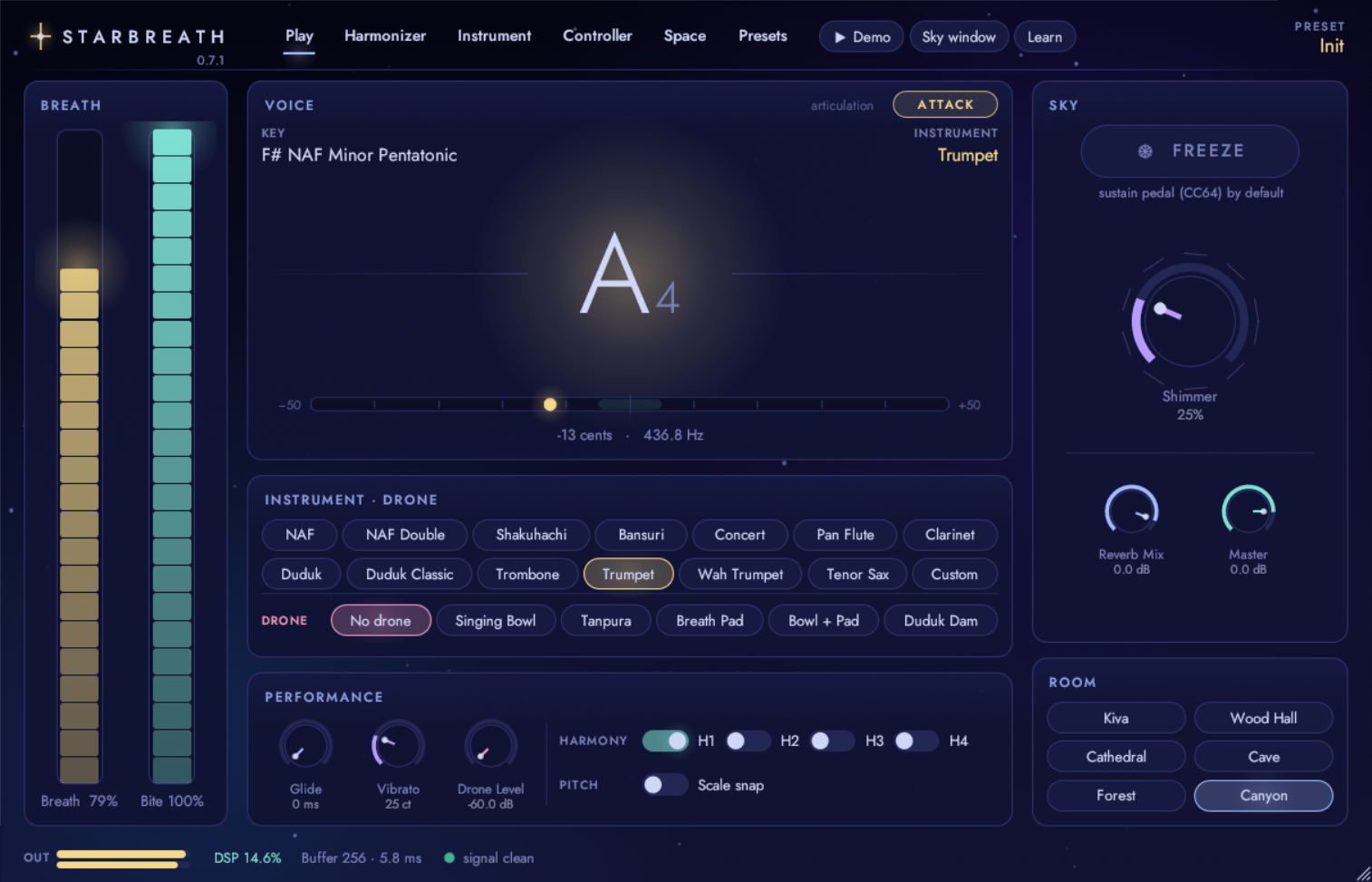
The real-time visualizer on the Play page is excellent. It displays:
- Currently played note
- Key information
- Dynamic pitch movement
- Microtonal vibrato fluctuations
Seeing those expressive pitch variations in real time can be quite informative, particularly when working with breath-controlled performances.
Vibrato can be controlled via modwheel or adjusted directly within the Performance section.
Sky Window
The Sky Window feature is visually pleasant enough, but personally it feels more like a gimmick than a genuinely useful production tool.
It doesn’t really improve the workflow, assist sound design decisions, or provide meaningful visual feedback related to performance.
Compared to practical features like the note visualizer, controller mapping system or harmonizer, Sky Window feels somewhat disconnected from actual music production needs.
The Play Tab
The Play tab functions as the central command center.
Most of the available parameters are accessible from this page, making day-to-day operation relatively straightforward.
For ambient, cinematic, meditation, drone, new age, atmospheric, soundscape and experimental productions, Starbreath includes a Drone feature.
This adds an underlying textural layer through dedicated presets such as:
- Breath Pad
- Singing Bowl
There are also roughly 30 presets covering largely ambient and atmospheric territory.
Some highlights include:
- Brass Nebula
- Starfield Flute
- Open Trumpet
- Tenor Late Night
The first two lean heavily toward expansive, reflective and experimental pitch-based sound design, while the latter examples are much more neutral and performance-oriented.
Overall, the factory preset library is solid. Nothing revolutionary, but there are enough useful starting points to showcase the engine’s strengths and help users build custom sounds without starting completely from scratch.
Instrument Tab and Sound Shaping
The Instrument tab houses the primary Voice module.
This section contains several useful tone-shaping controls:
Breath Noise
Adjusts the amount of air and breath content mixed into the sound.
Overblow
Influences transients and resonance characteristics, helping shape the instrument’s response and aggression.
Reed Stiffness
This parameter brightens or darkens the tone and behaves somewhat like opening or closing the lid of a piano. It can dramatically change the character of certain instruments.
Standard Controls
Additional parameters include:
- Brightness filter
- Attack envelope
- Damping (Release envelope)
- Humanize
Humanize introduces randomized variation across multiple parameters to prevent static, machine-like repetition.
Harmonizer
Starbreath also includes a harmonizer.
Users can create harmonic structures using preset voicing modes and generate up to four additional harmony voices.
Each harmony can then be individually adjusted inside the Space tab, providing a fair amount of flexibility for what is otherwise a monophonic instrument.
Space Tab
The Space tab handles both acoustic processing and spatial positioning.
Beyond standard reverb behavior, it includes spatial placement controls that help create a more immersive stereo image, somewhat resembling binaural positioning techniques and three-dimensional staging.
The reverb section offers two approaches.
The first is a traditional preset-based system featuring spacious environments including:
- Cathedral
- Cave
- Forest
- Canyon
The second is a dedicated Shimmer processor.
For those unfamiliar with the concept, shimmer reverb combines traditional reverberation with pitch-shifted feedback, creating bright, evolving harmonic tails that float above the original sound. It’s a popular effect in ambient and cinematic production because it can transform simple melodies into expansive, ethereal textures.
Additional harmonic controls are also available within the shimmer section.
Controller Tab
The Controller page handles MIDI assignments and performance response settings.
A particularly welcome feature is support for 14-bit MIDI CC.
Standard MIDI CC messages provide 128 discrete steps of resolution. 14-bit MIDI significantly increases that precision, allowing for much smoother parameter automation and expression control.
This becomes especially important when controlling breath pressure, pitch modulation, vibrato depth, dynamics and other continuously evolving performance gestures.
The Controller tab also provides:
- Breath curve shaping
- Pitch Bend support
- Aftertouch support
- Polyphonic Aftertouch support
This level of controller integration makes Starbreath considerably more appealing for expressive live performance than many free instruments.
Starbreath: Still Sounds Like a Beta
Although Starbreath is not officially labeled as a beta product, it doesn’t quite feel like a finished commercial release yet, and some rough edges are still apparent.
What I do appreciate is the licensing approach of the developer. Users who obtain Starbreath during this period will keep their license permanently after the official release.
That’s actually a refreshing move.
Many developers use time-limited beta licenses that expire once the finished product launches, effectively requiring testers to repurchase or upgrade later. Starbreath takes the opposite approach, which deserves credit.
Starbreath is far from perfect, but that’s not necessarily a criticism. This is still an unfinished product, and viewed through that lens, it’s actually quite promising.
The highlights are the browser-based demo, breath controller support, useful harmonizer, expressive performance features and some genuinely enjoyable brass instruments, particularly the Trumpet and Trombone.
The weaker areas are the inconsistent realism across certain instruments, the somewhat artificial Glide implementation, oversized default interface and a few features that feel more decorative than practical.
For a free physically modeled instrument that’s still under active development, Starbreath offers enough unique functionality to justify a download, especially for producers working in ambient, cinematic, world music, meditation, new age, soundtrack and expressive solo-instrument productions.
It’s not quite there yet, but it’s definitely a project worth keeping an eye on.

